
4 Chestnut Street
Exeter, NH 03833
Adult Services: 603-772-3101
Children's Services: 603-772-6036
Monday - Thursday: 9 AM - 8 PM
Friday: 9 AM - 5 PM
Saturday: 9 AM - 1 PM
_edited.jpg)

Libby by OverDrive


Starting October 15, 2026 Libby will require passwords for all users
When logging in to the Libby app or website, you will now need your 14-digit Library Card number and a password.
NEW Libby usernames and passwords
Username
Enter your barcode number
Password
your LAST NAME in all lowercase letters
Questions? Reach out to the library by phone at 603-772-3101 or by emailing exeterpl.ref@gmail.com
What to expect when updating your Libby
Step 1
Your Libby account will prompt you to enter your card number like the image below. Enter your 14-digit library card with no spaces

Step 2
The second screen will already have your card number. Enter your last name in all lowercase letter into the password field.

Step 3
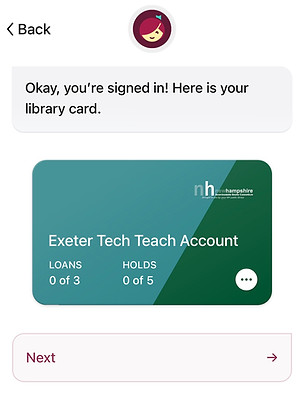
You should see a new screen with a colorful digital "card" and a message that says "You're signed in! Here is your library card". When you see this screen, you have successfully updated Libby.
Libby How-to
How to verify your library card in Libby with the new password
From the popup message:
1) tap Verify Card.
2) Enter your library card and password.
3) Once you’re signed in, you will get a success message.
If a pop-up message does not appear, follow the following steps:
1) Tap Menu
2) Tap Verify Card under “For Your Attention.”
3) Tap Verify Card again, then sign in with your library card and PIN or password.
How to use Libby with Kindle
Watch this video from the NH State Library
If you have questions regarding using Libby on your Kindle, check out the Libby Help page.
Why is Libby making the change to require passwords?
This change is being made by Libby for added security and to better protect user privacy. This is a mandatory change and you cannot opt-out.
Can I use the Libby app on my Kindle?
You can access Libby on any Kindle that can access the internet, most Kindle Fires have this ability. Kindle Paperwhite or basic black-and-white Kindles cannot install the Libby app. The Kindle app store will have the Libby app if the Kindle is compatible. Libby can still be accessed on Kindles via the internet and going to libbyapp.com and logging in with your username and password. For more Kindle help, go to the Libby help page.